


Aeroméxico
4.8288.00 Reviews
App Specs
- Version
- 1.4.35
- Updated On
- License
- Free
- Downloads
- 1,000,000+
- Developer
- Aerovías de México S.A. de C.V
- Categories
- Travel & Local
- Platform
- Android
Screenshots




 Analysis by AppCompare
Planning a flight with Aeroméxico can feel unnecessarily complicated when your information is spread between a browser, email confirmations, airport screens, and a separate travel wallet. I found the Aeroméxico mobile app most useful when I treated it as a practical companion for an existing trip rather than as a complete travel-planning universe. It brings the airline’s own journey tools into one place, which makes the first steps less intimidating for someone who has never used it before.
This is a free Travel & Local app from Aerovías de México S.A. de C.V., available for everyone and designed for Android devices running version 9 or later. Its store presence is substantial, with more than a million installs and an average rating of 4.8 from roughly 104 thousand ratings. Those figures do not replace personal testing, but they do suggest that the app has become a familiar tool for many Aeroméxico passengers.
My overall impression is positive, especially for travelers who already have an Aeroméxico booking or regularly fly with the airline. The experience is more valuable once a real reservation is involved: that is when checking a trip, preparing for departure, and keeping travel details close at hand become more convenient. If you are only comparing several airlines or building a complicated multi-airline itinerary, a general travel app or the airline’s website may still be the better starting point.
What to expect before you begin
The first thing to understand is the app’s role. It is not a replacement for every travel service on your phone. Instead, it is an airline-focused place to manage the Aeroméxico side of a journey. That narrower purpose is a strength because the information you need for an Aeroméxico flight is less likely to be mixed with unrelated bookings, hotel promotions, or other transport options.
I would recommend installing it when you have a confirmed flight, not only when you are casually dreaming about a trip. A real reservation gives you an immediate reason to open the app and makes it easier to judge whether the layout works for your travel habits. The useful test is simple: can you reach your trip details quickly, understand what action is available next, and return to the same information later without starting over?
The app is free, and its content rating is Everyone, so it is suitable for a broad range of travelers. The current version is 1.4.35, while the app was released on May 8, 2024. I would still keep the application updated through the normal app-store process, particularly before a travel day, because airline tools are the kind of software people depend on at inconvenient times.
One subtle advantage of an airline-specific app is context. When I use a general travel organizer, I often have to decide which details are authoritative if something changes. With Aeroméxico’s own app, the natural expectation is that the airline-related information should be the first place I check. I would not rely on a single phone screen as my only backup, though. Keeping the confirmation email or another record accessible is sensible in case the airport connection is poor or the phone battery is low.
Worth Reading Before You Choose

EA SPORTS FC Mobile 26 Is a Bigger Football Game, but It Takes Time

Flipboard Shows What News Apps Must Do Beyond the Feed

Switching to Android Auto Means Rethinking Your Driving Routine

Google Calendar Makes a Crowded Week Easier to Manage

Ludo King Makes the Most of the Minutes Between Plans

Baby Panda World Brings Quick Play to Modern Phones, but Its Game Library Feels Busy
There is also a trade-off. A focused airline app can feel less useful between trips than a broad travel application. If you fly many carriers, you may prefer one service that collects all reservations together. The Aeroméxico app makes the strongest case for itself when your immediate task belongs specifically to Aeroméxico.
Install it with a clear first task
For a first-time user, I suggest deciding on one small goal before opening the app. For example, you might want to locate an existing booking, review the next step for an upcoming flight, or keep the airline’s information available while traveling. This prevents the common mistake of judging the app from a quick glance at the opening screen without giving it a meaningful job.
Have the details associated with your reservation available before you begin. I found that preparation makes the first session calmer because you are not switching between messages while trying to remember what information the airline needs. If another person arranged the trip, ask that person to share the relevant booking details in advance rather than attempting to reconstruct them at the airport.
It is worth setting aside a few minutes for the first session instead of installing the app in a security line. Airports are noisy, crowded, and full of interruptions. A quiet setup at home gives you time to recognize where the trip information appears and to notice whether anything needs attention. That small investment can save much more time later.
Getting through the first setup
After installation, I would begin by looking for the route into an existing trip rather than exploring every screen. The most reassuring first result is seeing your Aeroméxico journey represented clearly enough that you know you are in the right place. If the app asks you to enter or connect reservation information, use the exact details from the airline confirmation and check each character carefully before assuming there is a problem.
Do not interpret a failed first attempt as proof that the app is unusable. Booking references and passenger information are easy to mistype, especially when a confirmation uses similar-looking letters and numbers. I recommend copying the information carefully from the original message, then trying again without adding spaces or extra punctuation that may not belong there.
Once the trip is visible, pause and inspect it before moving on. Confirm that the traveler and route are the ones you expected. This is a better habit than immediately tapping through every available option. It also gives you a baseline: if the details are correct now, you will know what the app should show when you return later.
I would not fill the opening session with unnecessary exploration. Airline apps can present several travel-related actions, but not all of them matter at the same moment. First make the booking easy to find. Then learn the action you are most likely to need before departure. The rest can wait until you have a reason to use it.
One practical tip is to open the app again after setup and test the route to your trip from a clean start. This is different from leaving the reservation screen open. A traveler who knows how to reach the correct information from the beginning is better prepared than someone who only remembers a particular screen discovered by accident.
Your first meaningful success
For me, the first successful action is not simply installing the app. It is opening it, reaching the correct Aeroméxico trip, and understanding what the next useful step is without needing to search through old messages. That moment tells you whether the app can reduce friction in your own travel routine.
A realistic example is a morning flight later in the week. At home, I would open the app, locate the booking, review the journey information, and make a mental note of where I need to return when departure gets closer. I would then close it and repeat the same process once, so the route feels familiar. On the travel day, I would rather spend a few seconds returning to a known trip than experiment with the app for the first time at the terminal.
The best workflow is to use the app as a checklist companion. Start with the reservation, identify the next available travel action, complete only what is relevant, and then stop. This keeps the experience focused and reduces the chance of making a rushed change simply because an option was visible.
Another useful habit is checking the app at two different moments: once during preparation and again nearer to departure. The first check is for orientation. The later check is for current travel information and any action that has become relevant. I would avoid assuming that one early visit is enough for an entire journey.
The real win is not having another travel app installed; it is knowing exactly where your Aeroméxico trip is when you need it. That distinction matters for first-time users. If the application helps you answer “Where do I go next?” more quickly, it is doing its job. If you only open it to browse without a booking or travel task, its value will naturally feel limited.
Where the app fits better than usual alternatives
Compared with using a mobile browser, the dedicated app feels more appropriate for repeat access to an Aeroméxico trip. A browser is still useful when you are on a shared device, when you do not want another installation, or when you are comparing airlines. The app becomes more attractive when you expect to return to the same airline information several times before and during a journey.
Compared with a general travel organizer, the advantage is specialization. A general organizer can be excellent for combining flights, hotels, trains, and reservations from different companies. It may give you a wider view of an entire vacation. The Aeroméxico app is the more direct choice when your question is specifically about the Aeroméxico portion of the trip and you want the airline’s own mobile experience.
I also see a useful division of labor between the two. I would keep a general organizer for the complete itinerary, but use this app for Aeroméxico tasks. That approach avoids forcing one application to do everything. It is especially sensible for a trip that includes another carrier, because a single-airline tool should not be expected to become your master itinerary.
Common confusion and how I would handle it
The first confusion is expecting the app to be a universal travel dashboard. It is not the right tool for someone who wants one place to manage every airline, accommodation, and ground-transfer detail. If your trip is built from several providers, keep the broader itinerary elsewhere and use this app only for the Aeroméxico segment.
The second is assuming that an app can remove every airport uncertainty. It can make airline information easier to reach, but it does not eliminate the need to pay attention to airport announcements, signs, staff instructions, or your own travel documents. I would treat it as one reliable reference, not as permission to ignore the physical airport environment.
A third point is the difference between seeing a trip and being ready for travel. Locating a reservation is an important first step, but it is not the same as completing every preparation task. After your trip appears, read the available options carefully and decide what actually applies to your situation. Do not tap through screens merely to make the setup feel complete.
Some users may also wonder whether they need an account immediately. My practical advice is to follow the path that matches your booking and avoid creating extra complexity unless the app makes it necessary for the action you want. The goal of the first session is a dependable route to your trip, not a collection of unused profile settings.
If information appears different from what you remember, compare it with the original Aeroméxico confirmation and take a moment before acting. Travel details deserve deliberate checking. When the issue concerns an important change or a situation the app does not make clear, contacting Aeroméxico through its official support channels is more sensible than repeatedly tapping around.
Another point worth remembering is connectivity. I would not wait until boarding to discover that I have never opened the app on my current phone or that I cannot remember how to reach the booking. Open it while you have a stable connection, review the relevant information, and keep your phone charged. These are simple habits, but they matter more than learning every corner of the interface.
Making the second trip easier
After the first successful session, the next step is to build a repeatable routine. I would open the app when a new Aeroméxico booking is made, confirm that the trip is easy to reach, and revisit it during preparation. This turns the app from something you install in a hurry into a familiar part of your travel checklist.
For frequent Aeroméxico passengers, that repetition is where the app earns its place. You begin to know which screen answers your usual question and which actions can wait. The benefit is not dramatic automation; it is reduced searching and fewer moments spent moving between unrelated sources.
For occasional travelers, the app can still be worthwhile, but I would uninstall it after the journey only if phone storage or notification clutter is a concern. Installing it again for a future flight is reasonable, although setting it up before the travel day remains the safer approach. Someone who travels very rarely and prefers a browser may not gain enough from keeping a dedicated airline app permanently.
Families should decide in advance which phone will serve as the main travel device. Having one organized device can be easier than asking every passenger to repeat the same setup. At the same time, the traveler responsible for the booking should keep access to the confirmation outside the app as a backup. This is not a criticism of Aeroméxico specifically; it is good preparation for any mobile-dependent journey.
Business travelers may appreciate the focused access when their schedule already revolves around Aeroméxico flights. However, anyone managing several carriers for one work trip should not abandon a broader itinerary system. The airline app is strongest as a precise tool inside a larger process, not necessarily as the only travel record.
Who should use it, and who should skip it
I would recommend Aeroméxico to passengers with an Aeroméxico reservation who want a dedicated mobile route to their airline information. It is also a sensible choice for repeat customers who prefer handling travel details on a phone instead of returning to a browser each time.
I would be more cautious about recommending it to travelers who are still comparing airlines, building a mixed-carrier itinerary, or looking for a single application to organize an entire vacation. In those cases, a general travel service can provide a wider overview. You can still add the Aeroméxico app later if one part of the trip needs airline-specific attention.
It may also be a poor fit for someone who dislikes installing dedicated apps and already has a reliable browser-based routine. The free price removes one barrier, but convenience is personal. An app is only helpful when it is easier for you to use than the alternative you already trust.
My final take after using it
I see Aeroméxico as a focused, practical companion for passengers who have a genuine Aeroméxico journey to manage. Its strongest quality is not that it tries to cover every travel need, but that it gives the airline’s customers a dedicated place to begin, check, and revisit their trip. The 4.8 average and broad installation base make it easy to understand why many travelers keep it available, while the free access makes trying it low-risk.
My advice to a first-time user is straightforward: install it before the airport, prepare your booking details, locate the trip, repeat the route once, and keep a separate backup of important travel information. That sequence gives you a meaningful test without turning setup into a project.
With its Everyone rating, support for Android 9 and later, and current version 1.4.35, it is accessible to a wide range of Android travelers. I would choose it over a browser when I expect to check an Aeroméxico journey more than once, and over a general organizer when I need the airline-specific view. I would not use it as my only tool for a complex vacation involving several companies.
In short, Aeroméxico is most convincing when used deliberately: one airline, one trip, one clear next action. If that matches your situation, it can make the path from installation to confident travel noticeably smoother. If it does not, a broader travel app or a simple browser workflow may serve you better.
Pros
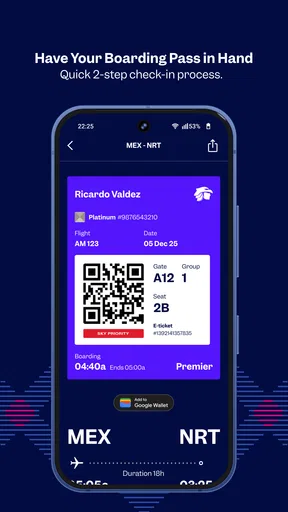
- Convenient mobile check-in and digital boarding pass access.
- Flight status updates help travelers monitor schedule changes.
- Manage bookings
- seats
- and add-ons directly from the app.
- Supports Aeroméxico’s loyalty program for points and member benefits.
- Useful travel notifications can reduce the need to check email constantly.
Cons
- Some features may load slowly on weaker mobile connections.
- App performance can vary after major updates or during busy travel periods.
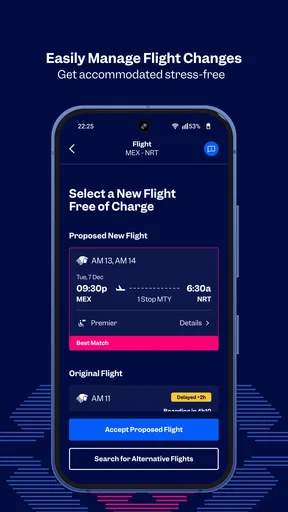
- Certain booking changes may still require contacting customer support.
- Fare and seat options can feel limited compared with the desktop website.
- Users may encounter occasional login or account synchronization issues.
FAQs for Aeroméxico
What is the Aeroméxico app used for?
The Aeroméxico app is the airline’s mobile travel companion for managing flights from an Android or iOS device. After signing in or entering your reservation details, you can review itineraries, check flight information, complete online check-in when available, access boarding passes, and receive travel updates. It is especially useful for keeping booking information in one place instead of relying on printed documents or separate emails.
Can I book flights through the Aeroméxico app?
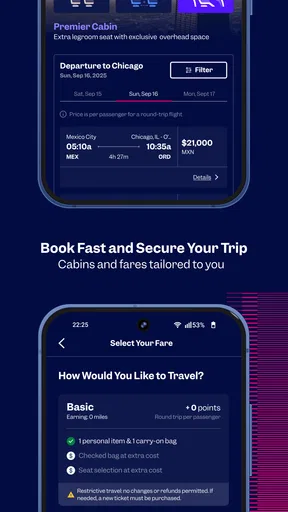
Yes, the app generally allows travelers to search for available Aeroméxico flights, compare schedules, choose eligible fares, and complete a reservation using supported payment methods. The final price may vary depending on the route, travel dates, fare type, taxes, baggage, and optional services. Before paying, review the passenger names, dates, airport information, and fare conditions carefully, since changes and cancellations depend on the selected ticket.
Can I check in and use a mobile boarding pass in the Aeroméxico app?
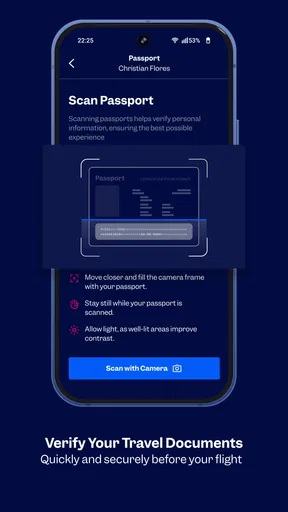
For eligible flights, the Aeroméxico app can provide online check-in and a digital boarding pass that can be displayed at the airport. Availability may depend on the route, passenger documentation, airport rules, and the type of reservation. It is still wise to check in advance whether your destination requires document verification at the counter. Save the boarding pass offline or take a screenshot in case airport internet access is unreliable.
Does the Aeroméxico app show flight status and travel notifications?
The app is designed to help passengers monitor flight details such as departure times, arrival information, gate changes, and other itinerary updates when data is available. Notifications can be helpful during delays or schedule changes, but they should not be your only source of information. Keep notifications enabled, use a stable internet connection, and also check airport screens or speak with airline staff when the situation is urgent.
Is the Aeroméxico app free, and what should I know before downloading it?
The Aeroméxico app is typically free to download, although using it requires an internet connection and your mobile provider may charge for data, particularly while traveling internationally. Some services, such as checked baggage, seat selection, upgrades, or itinerary changes, can involve additional airline fees. Download the official app from the Google Play Store or Apple App Store, check the developer name, and keep it updated for security and compatibility.


